School expenses and net collection: a decision guide
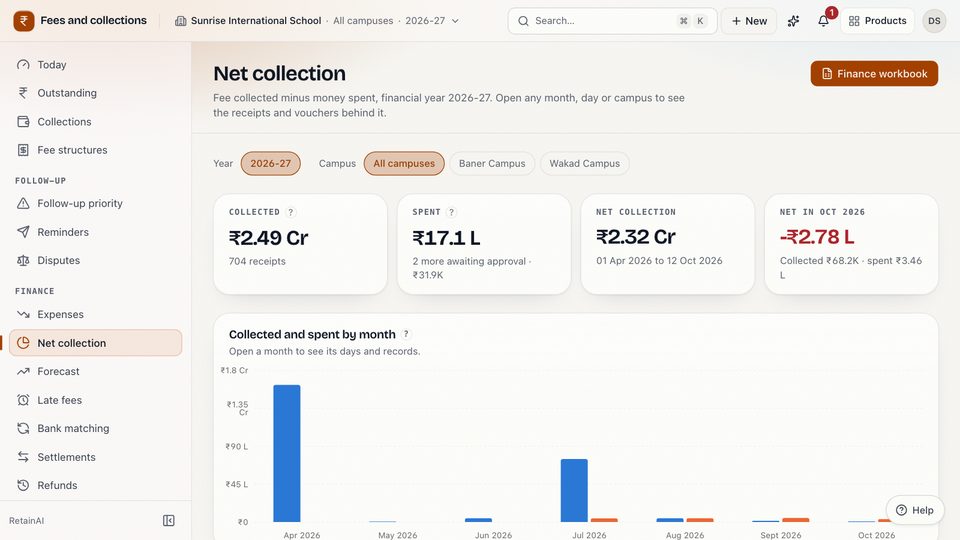
How a school can track expenses and net collection: vouchers with bills, an approval limit, and when money counts as spent. With Campus One's own rules.
The situation: "how much did we actually keep this month?"
The owner asks a simple question at the end of the month: fees came in, money went out, what is left, campus by campus? The accountant has the fee receipts in one system, the diesel bills in a file, the electricity bill on email and a petty-cash notebook in the drawer. The answer takes two days, and it is different depending on who adds it up.
The tension: control without holding up the office
Every school wants two things that pull against each other. The owner wants control: no money going out without a bill and a second pair of eyes. The office wants speed: nobody wants to wait three days for a signature on a ₹600 courier bill. Most schools end up with one of two failures: everything needs the owner's signature and the office works around it, or nothing does and the owner finds out at the audit.
The insight: decide three rules, then let the system apply them
Expense tracking is not a software feature. It is three decisions: what a voucher must hold, who approves what, and when money counts as spent. Once those are written down, a system can apply them to every voucher the same way and add them up without anyone's spreadsheet.
Decision 1: what a voucher must hold
A voucher should answer, on one page: what was bought, from whom, for which campus, on which date, for how much, paid how, and where the bill is.
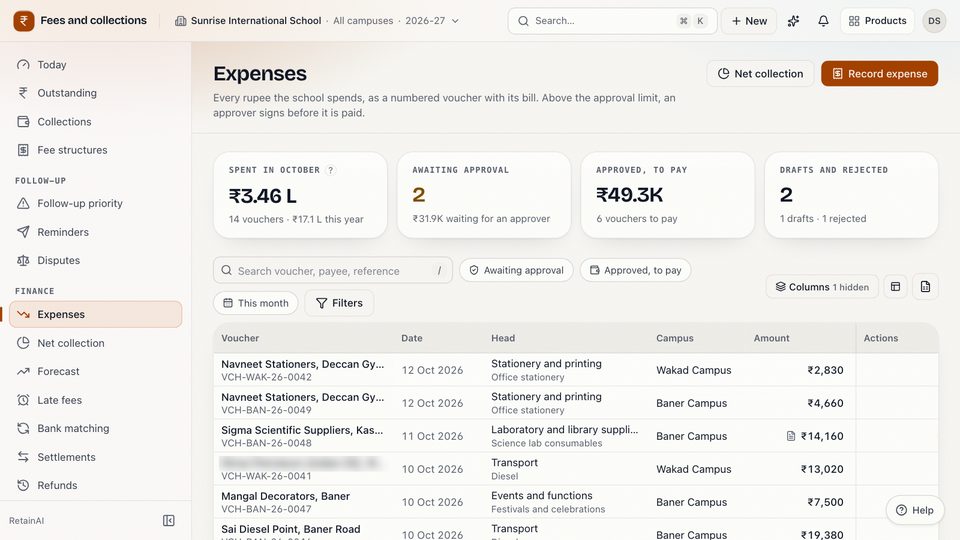
In Campus One a voucher holds the campus, the bill date, a head and sub-head, the payee and their GSTIN, the amount with GST included and the GST part, the payment mode (cash, UPI, bank transfer, cheque or card), a reference number, a description and can hold the bill itself, as a PDF or a photo up to 10 MB. A voucher cannot be dated in the future, and the GST cannot be more than the amount.
Numbering matters more than it looks. Each voucher gets a number such as VCH-BAN-26-0001: a prefix, the campus code, the financial year (April to March) and a gapless four-digit sequence for that campus and year. A missing number is then a question someone has to answer, not a habit.
Campus One starts with ten heads that most Indian schools use (utilities, transport, maintenance and repairs, housekeeping and security, stationery and printing, events, laboratory and library supplies, professional fees, bank charges, and miscellaneous), each with sub-heads such as diesel or audit fees. A school can rename or hide them. Salaries are not an expense head: payroll is its own ledger, so it is never counted twice.
Decision 2: who approves what
Pick one amount below which the office can act alone, and above which someone else signs. In Campus One that is one approval limit per school, set by someone who approves expenses (the demo school uses ₹10,000). A voucher at or below the limit is approved when it is submitted; a voucher above it waits for an approver.
Two rules hold whatever the limit:
- The person who records money going out does not approve it. In Campus One's default roles the accountant can record, submit, pay and cancel vouchers, but cannot approve them or change the limit.
- Nobody approves a voucher they submitted, even if they hold the approval permission.
A rejection needs a reason. Only a draft or a rejected voucher can be edited; once approved, a voucher cannot be changed, only cancelled with a reason, and its number stays in the series. Nothing is deleted. Only an approved voucher can be marked paid, and cancelling a voucher that was already paid needs an approver.
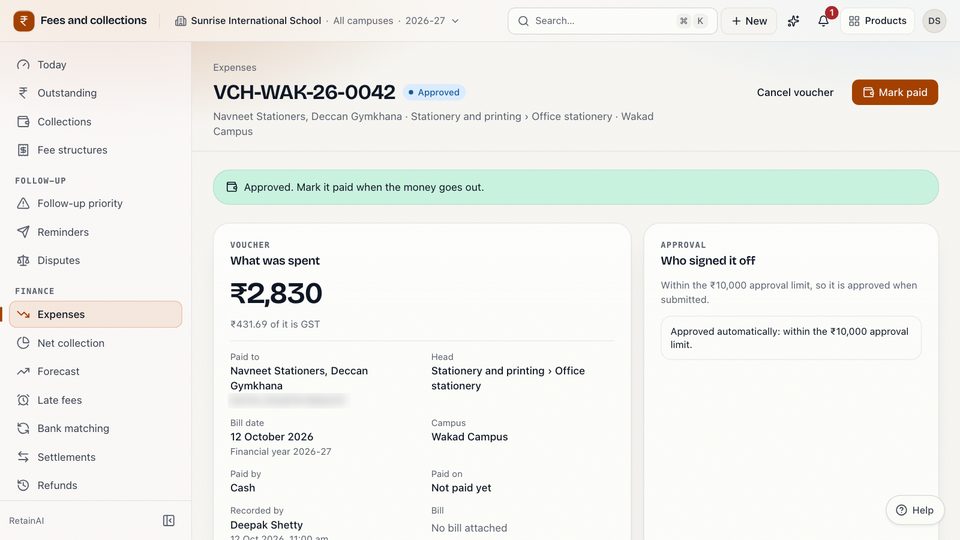
Today the screens set one approval level. The approval engine underneath supports more stages, but a school cannot yet set two levels (for example the principal up to one amount and a trustee above it) from the page.
Decision 3: when money counts as spent
This is the decision most schools never make explicitly, and it is why two people get two answers.
- At payment (cash basis). An expense counts when the money leaves the bank or the cash box. The figure matches the bank, but a large approved bill that is paid next month makes this month look better than it is.
- At approval (commitment basis). An expense counts when someone with authority approves it, dated by its bill, whether or not it has been paid. The figure shows what the school has committed to, and unpaid bills are visible as payables.
Campus One counts an expense as spent when it is approved, dated by the bill date, and keeps "Approved, to pay" as a separate figure so the office knows what still has to go out. The paid date is recorded and exported, but it does not move an expense to another month. Vouchers still awaiting approval are shown beside the figure and not counted.
If your auditor or owner thinks in cash, use the paid date in the finance workbook to see the same vouchers on a cash basis. The point is to choose one definition and say it on the screen.
Net collection: one figure, and the records behind it
With those three decisions made, net collection is arithmetic. In Campus One:
Net collection = cleared fee receipts (by the date received) − approved expense vouchers, paid or not yet paid (by bill date).
It is shown for the financial year to date, by month and by campus, with a campus comparison. Every figure opens the records behind it, down to the day, the receipts and the vouchers.
Two things it does not do, so you are not surprised:
- Refunds are not subtracted. Refunds paid out appear as a separate line in the finance workbook's summary.
- Expenses do not go to Tally. The Tally export covers fee receipts and refunds; expenses leave Campus One through the finance workbook.
The finance workbook for the accountant
The finance workbook is one Excel file with six sheets: Summary, Fee dues by student, Collections, Expenses, Concessions and adjustments, and Defaulters. The Expenses sheet has every voucher with its number, bill date, campus, head and sub-head, payee, GSTIN, amount, GST, status, whether it counts as spent, who approved it and when it was paid. Downloading it needs the export permission, and the download link expires after 24 hours.
Questions to ask about any expense module
- Does every voucher have a number from one gapless series per campus and year?
- Can a bill be attached, and is it kept with the voucher?
- Can the person who records an expense approve it?
- Can an approved voucher be edited or deleted?
- When does an expense count as spent, and does the screen say so?
- Does net collection open the receipts and vouchers behind it?
The takeaway
Decide what a voucher holds, who approves what and when money counts as spent, then let every voucher follow the same rules. Net collection stops being a two-day spreadsheet and becomes a figure anyone can open and check. The expenses and net collection page and the fees page describe each part, or you can explore the demo school, a read-only demo with made-up data.
Key takeaways
- Every rupee that goes out should have a voucher, a number from one gapless series and a bill attached.
- Set one approval limit, and never let the person who records an expense approve it.
- Decide when an expense counts as spent. Counting at approval shows commitments early; counting at payment shows cash.
- Net collection is only useful if every figure opens the receipts and vouchers behind it.
Questions
When does Campus One count an expense as spent?
When the voucher is approved, dated by its bill date, whether or not it has been paid yet. Approved vouchers that are not yet paid are shown separately as approved, to pay. Vouchers awaiting approval are shown beside the net figure but not counted.
Can the accountant approve an expense?
No. In Campus One's default roles the accountant cannot approve expenses. Vouchers above the school's approval limit go to someone who holds the approval permission, and nobody can approve a voucher they submitted.
Does net collection subtract refunds?
No. Net collection in Campus One is cleared fee receipts minus approved and paid expense vouchers. Refunds paid out appear as a separate line in the finance workbook.