WhatsApp fee reminders with a payment link, done politely
A guide to fee reminders on WhatsApp with a payment link: who is never reminded, quiet hours, weekly limits, receipts, and what Campus One simulates.
The situation: ten days after the due date
The second instalment fell due ten days ago. The accounts office has a list of families who have not paid, a phone, and a WhatsApp group nobody wants to use for money. Some families forgot. Some are waiting for a salary. One has an open question about a concession, and one child is on an RTE seat and owes nothing at all.
A reminder is the right next step for most of them. For a few it would be wrong, and for all of them it should be polite, sent at a sensible hour, and easy to act on.
The tension: chasing money from families you also teach
Schools are not collection agencies. The family that gets a sharp message at 10 p.m. on a Sunday is the same family that sits in the parent-teacher meeting next month. At the same time, a reminder that only says "please pay" sends the parent to the counter, the queue and the receipt book, and the office spends the next week matching bank transfers by hand.
So the question is not whether to remind. It is how to remind so that the right families hear from you, at the right time, with a way to pay that comes back as a receipt.
The insight: a reminder is a service message with rules
Treat a fee reminder like a bus delay message: useful, specific, rare and never personal. That gives you three sets of rules to settle before the first message goes out: who is never reminded, when and how often, and what happens after the parent pays.
The decision: rules to settle before you send
1. Who is never reminded
Write the list down. In Campus One the reminder rules skip, before anything else:
- families marked "No reminders, at parent's request";
- RTE seats, where the tuition is reimbursed by the state;
- accounts with an open dispute that pauses reminders;
- families with an open payment promise, until the promised date has passed;
- anyone who paid in the last 24 hours;
- students who have left, accounts with nothing due, and guardians with no number.
The skipped families are listed with the reason, so the office can see who was left out and why. These skips are always on; a school does not switch them off.
2. When, and how often
The default rules in Campus One are: no messages between 20:00 and 09:00 India time, no messages on Sundays, at most two reminders per student's fee account in seven days, and at least 48 hours between two messages. A school can change the quiet hours, the weekly limit and the gap on its settings page.
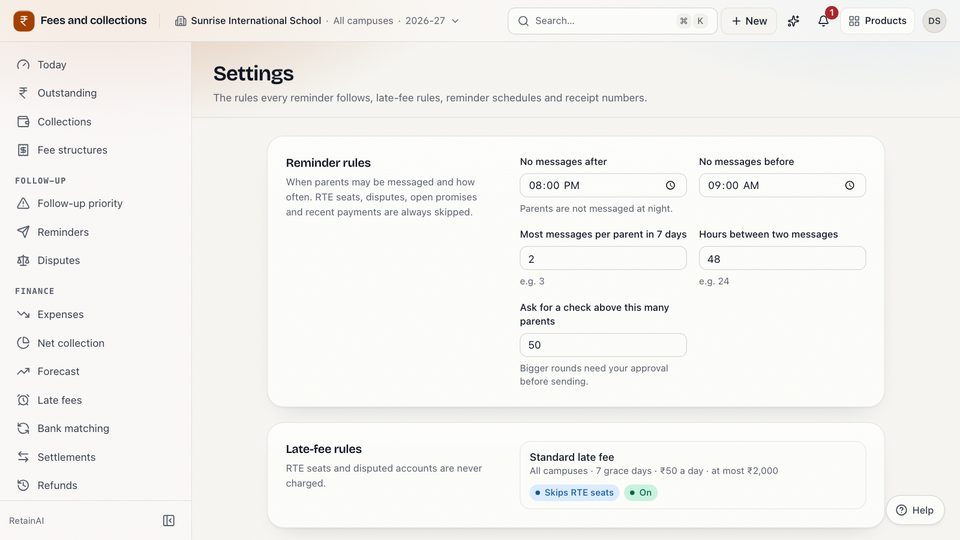
A reminder that falls inside quiet hours or too soon after the last one is held, not sent, and the preview says so. Held reminders are not sent later by themselves: the office sends the round again when the window opens.
3. Who presses send
Reminders go out only when a person sends them: one family at a time from the student's fee account, or many at once from the outstanding list. Before a large round, Campus One shows a preview with how many will be sent, held and skipped, and the exact message parents will see. For a round to more than 50 parents (the default; the school can change the number), a person has to tick "I have checked this list and want to send these reminders" before anything goes out.
4. What the message says
Short and the same for every family. The English text in Campus One reads:
Dear {guardian}, this is a gentle reminder from {school} that {amount} is due towards {student}'s school fees. You can pay securely online here: {link} If you have already paid, please ignore this message. Thank you.
In the real message the link sits on a line of its own.
It goes in the family's language where one is set (English, Hindi or Marathi), and on WhatsApp it is sent as a template the school has had approved by Meta. No threats, no mention of the child's results, no deadline the school has not decided.
5. What the link does
The link opens a payment page on the school's own Razorpay account, so the money goes to the school, not to the software company. It covers the overdue instalments (or the next ones due if nothing is overdue), it expires after seven days, and part payment through the link is off. Razorpay's own SMS and email reminders are switched off, so a parent gets one reminder, not three.
6. What happens after the parent pays
This is where most reminder systems stop and the office starts retyping. In Campus One:
- Razorpay tells the school's own webhook address about the payment. The message's signature is checked before anything is read, and each payment is recorded once, even if the same notice arrives twice.
- The amount clears the link's instalments first, oldest due first; anything extra goes to the student's other open instalments, and any remainder is kept as an advance.
- A numbered receipt is issued from one gapless sequence per campus and financial year, the same sequence as payments taken at the counter.
- The parent gets a WhatsApp message with the receipt number. That message runs after the payment is saved, so a messaging problem never undoes a payment.
Settlements can be imported from Razorpay's settlement file and matched; anything that does not match goes to a person. Refunds need evidence and a second person's approval, and the receipt itself is never edited.
Consent, opt-outs and the word "delivered"
Be precise with parents and with yourself. Campus One treats a fee reminder as a service message about an amount the family owes: it does not ask for a marketing opt-in first, but it skips every family marked "No reminders, at parent's request". Marketing messages are different: in Campus One they need the family's opt-in first.
Today the office cannot set the "No reminders" mark by hand from the fee account; it is set when a parent asks on an AI reminder call. If a family asks the office directly, note it and leave them out of the next round until the mark can be set.
Campus One shows a WhatsApp reminder as sent when WhatsApp accepted it, never as delivered or read, because it does not record WhatsApp delivery receipts for these messages. A vendor that shows "delivered" should be able to tell you where that word comes from.
What the demo shows, and what waits for keys
The software is built, but it does not send or charge anything until the school connects its own accounts. Until then, in the demo and in any school that has not added its keys, Campus One says so in places such as these:
- "Reminder recorded, not sent (simulator)" after a reminder;
- "[simulated link, no payment page]" in place of a real link;
- "Simulated online payment of ₹… received" on the student's timeline, with "Simulated online payment — no money moved" in the payment's note;
- a "Finish setting up" card for the person who can add the WhatsApp Business and Razorpay keys.
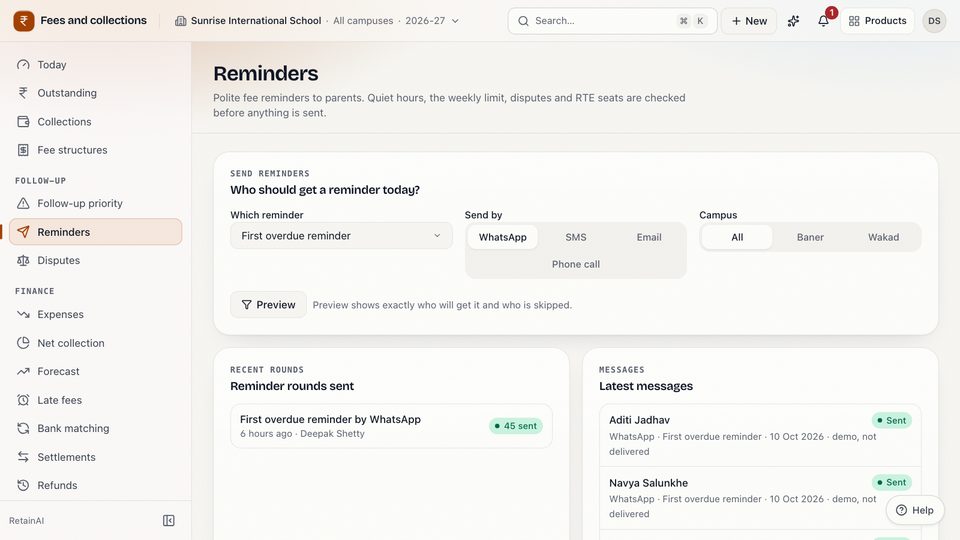
On the Reminders page each simulated message in the latest messages list carries "demo, not delivered" (picture at the top of this article).
Adding the keys is a school decision: Razorpay needs the school's own account and its checks, and WhatsApp needs a Business account with approved templates.
Where AI fits, and where it does not
Balances, receipt numbers and the allocation of a payment are arithmetic in the fee ledger; no AI writes them. Reminders go out only when a person sends them. Campus One's payment follow-up priority uses payment behaviour only (never attendance, marks, siblings or whether a family has a concession) and is never used to block portal access, report cards, exams or admission.
AI reminder calls exist too, and they run on a test line until a real phone line is set up for the school: nothing rings. Their instructions say never threaten, never mention any consequence for the child, and never offer a discount, waiver or instalment plan on the call.
Limits today
- WhatsApp sending and Razorpay payments are simulated until the school adds its own keys.
- Reminder links and parent-portal payments cannot be part-paid (the portal pays all unpaid instalments at once); staff can allow part payment only when they create a link by hand.
- Held reminders are not re-sent automatically.
- Late fees are posted by a daily job from rules set up with the team; they are not edited on screen.
Questions to ask about any fee reminder system
- Who is skipped automatically, and can the office see why?
- What are the quiet hours and the weekly limit, and who can change them?
- Does the payment link go to the school's own account?
- Does a paid link become a numbered receipt without anyone retyping it?
- What does the screen say when a message or payment is only simulated?
- Does any AI decide who is reminded, or what anyone owes?
The takeaway
A good fee reminder is rare, polite and specific, and the payment comes back as a receipt on its own. Settle who is never reminded, when messages may go and what happens after payment, then let the software apply the same rules to every family. The Campus One fees page and the parent messages page describe each part, or you can explore the demo school, a read-only demo with made-up data.
Key takeaways
- Decide who is never reminded before you send the first message: RTE seats, open disputes, open promises and families who asked you to stop.
- Quiet hours, a weekly limit and a gap between messages keep a reminder a service, not pressure.
- A payment link should clear specific instalments and come back as a numbered receipt, without anyone retyping it.
- Ask any vendor what happens without keys: a simulated message must say it was not sent.
Questions
Can parents pay school fees online through Campus One?
Yes, through a payment link on the school's own Razorpay account. Until the school adds its Razorpay keys, links are simulated and nobody can pay through them; the demo never moves money.
When are WhatsApp fee reminders not sent?
By default not between 20:00 and 09:00 India time, not on Sundays, not more than twice in seven days for each student's fees and not within 48 hours of the last one. RTE seats, open disputes, open payment promises, a payment in the last 24 hours and families who asked not to be reminded are skipped.
Does a parent get a receipt on WhatsApp?
Yes. When a payment through the link is recorded, Campus One issues a numbered receipt and sends a WhatsApp message with the receipt number. Until WhatsApp is connected, that message is recorded as simulated.